What you need to know first
Export WhatsApp chats one by one; start with high-signal fundraising conversations.
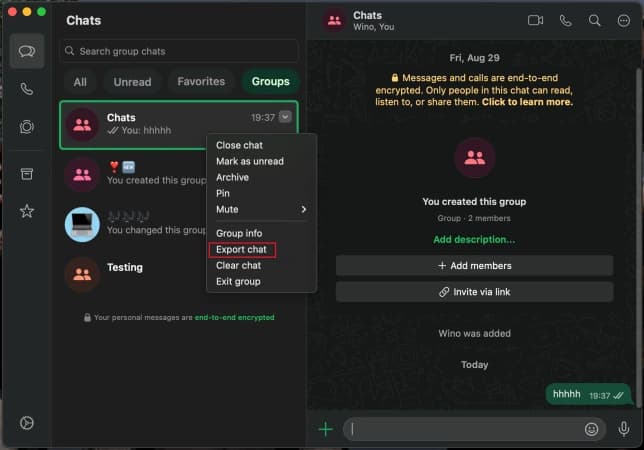
If your WhatsApp Desktop app shows Export chat, use it first: it is the shortest path to a computer-ready file.
Use Without media for a smaller text export, or Include/Attach media when files, voice notes, images, or decks matter.
If Advanced chat privacy is enabled for a conversation, WhatsApp can block chat export.
Export the chat
WhatsApp export is conversation-level: one individual or group chat becomes one TXT or ZIP. Start from WhatsApp Desktop if Export chat is visible in your app; if it is missing on your platform/version, use the iPhone or Android flow below.
Pick the fundraising chats first
Do not try to export every WhatsApp thread. Start with investor DMs, connector chats, founder group chats, advisor conversations, and any thread where a commitment, intro, next step, or diligence request happened outside email.
On desktop: use Export chat from the chat menu
Open the chat in WhatsApp Desktop, use the chat context menu or dropdown, then choose Export chat or Export conversation. Save the resulting file locally and upload it to RoundOS. If the item is not available in your desktop build, use the phone export path and move the TXT or ZIP to your computer.
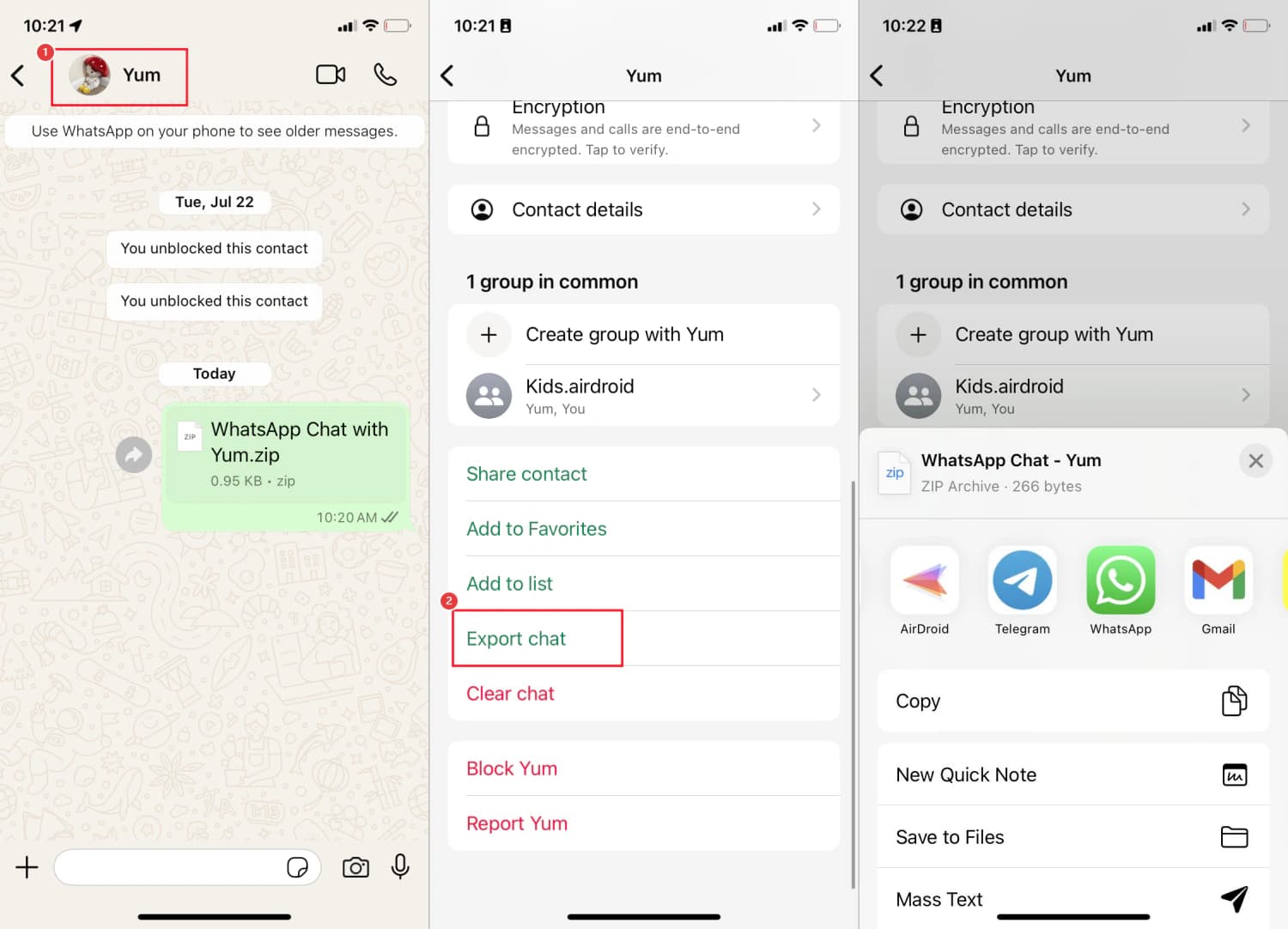
On iPhone: open chat info and tap Export chat
Open the individual or group chat, tap the contact or group name at the top, then scroll to Export chat. WhatsApp will prepare a file you can send or save from the iOS share sheet.
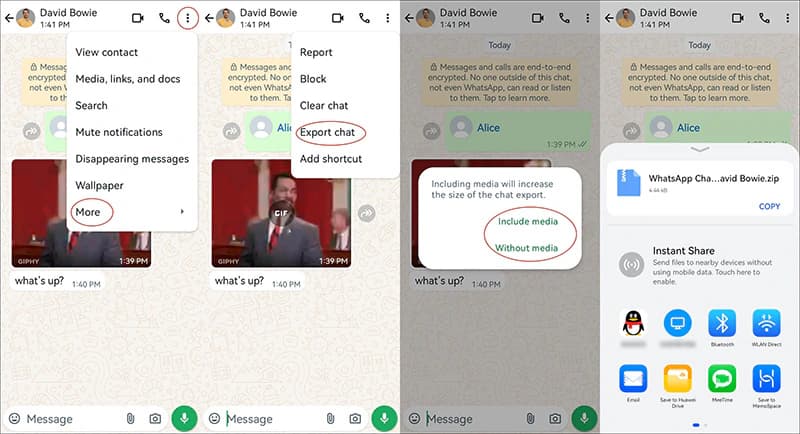
On Android: More options, More, Export chat
Open the chat, tap the three-dot More options menu, choose More, then Export chat. WhatsApp then asks whether you want to include media or export only the text.
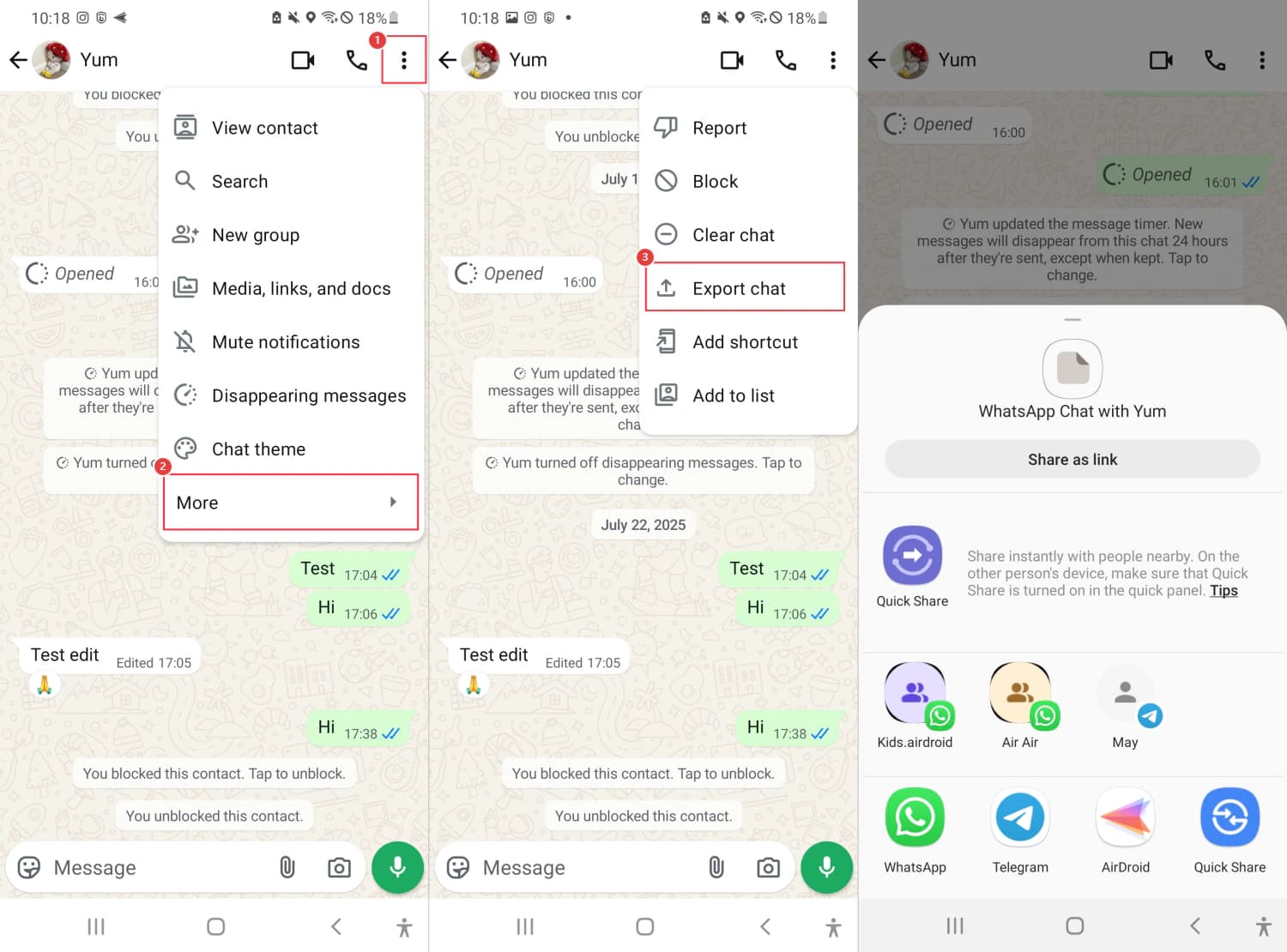
Save the TXT or ZIP where you can upload it
Without media is faster and usually enough for relationship memory. Include media when the chat contains decks, screenshots, documents, voice notes, or images that explain the fundraising context. Save the file to Files, Drive, email, or AirDrop so you can upload it to RoundOS.
Upload each chat export to RoundOS
Upload each exported conversation as its own source. Keep the filename recognizable, for example WhatsApp - Sarah Chen.zip or WhatsApp - Founder group.txt. RoundOS can then attach the context to the right investor, connector, company, or next move for review.
Why WhatsApp is worth importing
A lot of fundraising work escapes email: quick investor nudges, connector promises, founder backchannels, partner-meeting prep, voice notes, and informal commitments. WhatsApp exports help RoundOS recover that off-email context and turn it into reviewed CRM memory.
Sarah asked for the deck before Monday
Next moveAlex offered a warm intro to Meridian
Warm pathAdvisor flagged a partner-meeting angle
ContextWhich WhatsApp chats to export first
Use the desktop app when Export chat is visible
For a founder working on a laptop, this is the cleanest path: export the chat directly from WhatsApp Desktop and upload the local file.
Investors, connectors, advisors
Prioritize conversations where someone asked for materials, offered an intro, discussed timing, shared diligence feedback, or gave a clear next step.
Noisy groups and personal threads
Skip broad personal chats, sensitive non-fundraising conversations, and groups where the export would add privacy risk without improving the round.
Privacy and export notes
WhatsApp exports are conversation-level files, not a single complete account archive. Plan to upload multiple files if your fundraising context is spread across several chats.
Desktop export availability can differ by app version and platform. If you do not see Export chat on desktop, the mobile export flow is the fallback.
Advanced chat privacy can block chat export for a specific individual or group chat. If Export chat is unavailable, do not work around another participant's privacy setting.
Only upload conversations you are comfortable using as fundraising CRM context. RoundOS should help organize evidence, not import unrelated private life.
Bring off-email investor context into the round.
Upload the WhatsApp chats that actually moved the raise, then let RoundOS turn informal asks, intro promises, and stale DMs into reviewed next moves.